Small Business Sales Software for Email Outreach



Casey O'Connor
Contents
- Yesware’s Email Tools for Small Business Success
- Multi-Touch Campaigns for Comprehensive Outreach
- B2B Contact Data for Precision Targeting
- Meeting Scheduler for Seamless Coordination
- Reporting and Analytics for Informed Decision-Making
- Cost-Effective Solutions Tailored for Small Businesses
- Conclusion
- Small Business Sales Software FAQs
Small businesses face a unique set of challenges when it comes to sales outreach and the small business sales software they use to help them do it.
On the one hand, they need to be able to contact (and subsequently keep track of) large numbers of leads, the volume at which is likely to grow very quickly for a certain time period — if, that is, your small business sales software can handle the scale.
On the other hand, many enterprise-level sales software platforms can be seemingly endlessly complex (and expensive) — usually needlessly so, for businesses of a certain size (SMBs).
Regardless, though, sales teams from businesses at all stages need reliable sales outreach software that matches their specific needs; a platform that will help them organize their contacts, track and manage their sales pipeline, and automate their outreach efforts.
The platform your team uses can make or break your ability to succeed and scale.
For small and medium businesses, that’s where Yesware comes in.
In this article, we’ll go over everything you need to know about Yesware, the small business sales software that helps sales reps stay in touch with prospects with ease, personalization, and data-tracked correspondence.
 All-in-one sales toolkitSource leads, automate outreach and tasks, and measure engagement
What Is Small Business Sales Software?
Small business sales software refers to B2B sales tools designed to help sales teams manage leads, track customer interactions, and streamline outreach without the complexity or cost of enterprise systems.
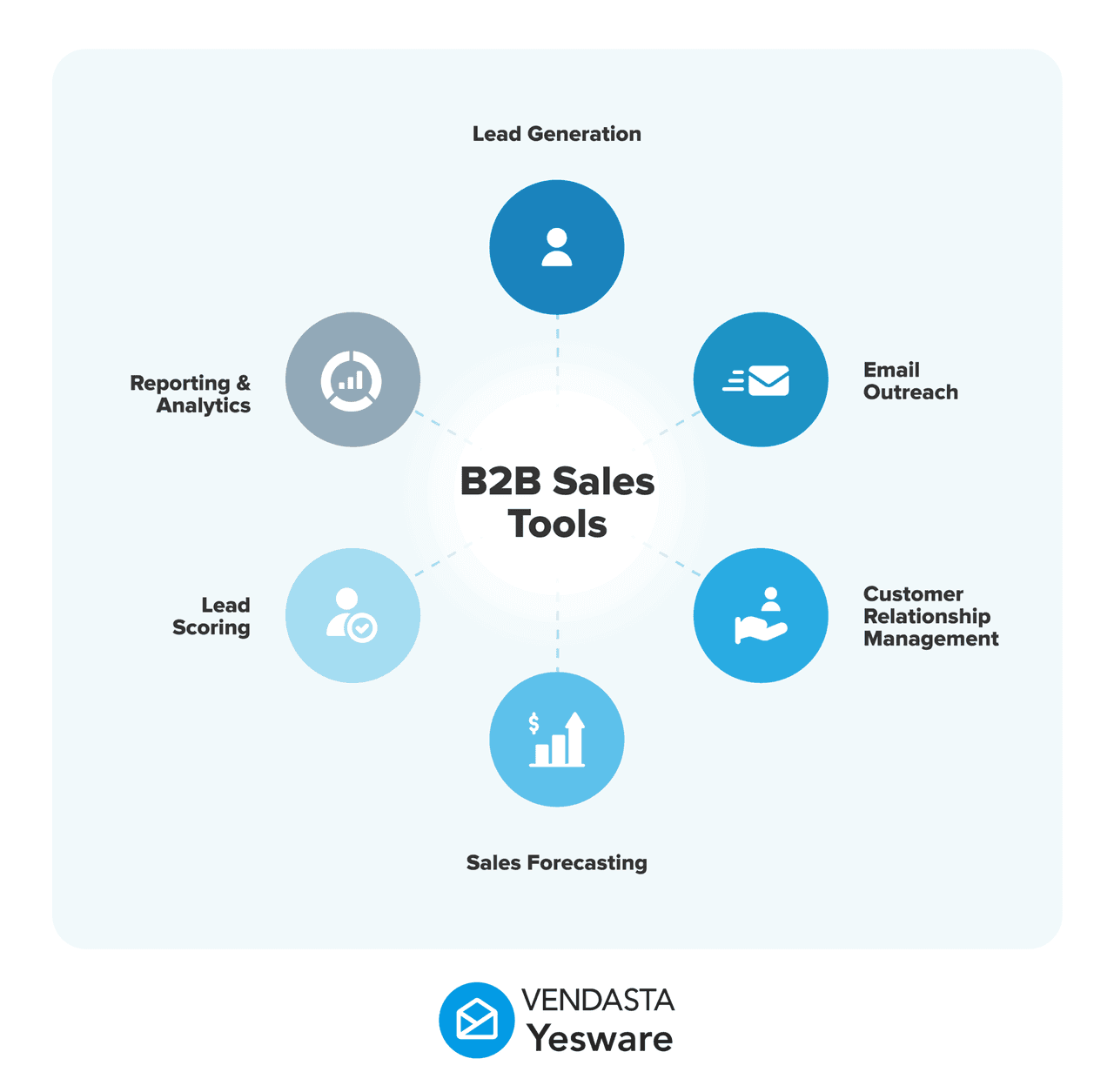
At its core, small business sales software centralizes sales activity in one place. It helps teams organize contacts, monitor deal progress, automate follow-ups, and gain visibility into what’s working throughout the sales process. Most modern platforms also integrate directly with email, calendars, and CRMs, allowing sales reps to work where they already spend their time.
Unlike enterprise sales platforms built for large, multi-layered organizations, small business sales software prioritizes ease of use, fast setup, and scalability. It’s built to support growing teams that need structure and insight without added operational burden.
Why Small Businesses Need Sales Software
As a small business grows, managing sales manually becomes increasingly difficult. Spreadsheets, inboxes, and disconnected tools quickly lead to missed follow-ups, incomplete data, and stalled deals. Sales software helps eliminate those friction points by bringing consistency and visibility to the sales process.
Key reasons small businesses rely on sales software include:
- Reducing manual work by automating repetitive tasks like follow-ups, data entry, and activity tracking.
- Centralizing sales data so contacts, conversations, and engagement history live in one place instead of being scattered across tools.
- Improving lead tracking by showing which prospects are engaged and where each opportunity sits in the pipeline.
- Supporting growth scalability by allowing teams to increase outreach volume and complexity without sacrificing personalization or organization.
With the right small business sales software in place, sales teams spend less time managing logistics and more time building relationships, following up at the right moment, and moving deals forward.
Types of Small Business Sales Software
Small business sales software isn’t limited to a single tool or function. Most sales teams rely on a combination of platforms, each designed to support a specific part of the sales process. Understanding these categories helps small businesses evaluate which tools they need today and how those needs may evolve as they grow.
CRM and Contact Management Software
CRM and contact management software help small businesses store, organize, and manage customer and prospect information in one centralized system. These tools track communication history, manage relationships over time, and give sales teams a clear view of every interaction tied to a contact or account.
For small teams, CRM software reduces the risk of losing leads, duplicating outreach, or relying on scattered notes and inbox searches to understand past conversations.
Outreach Automation Tools
Outreach automation tools focus on helping sales teams send consistent, timely messages at scale. These platforms allow reps to automate follow-ups, schedule touchpoints, and personalize outreach without manually writing every email.
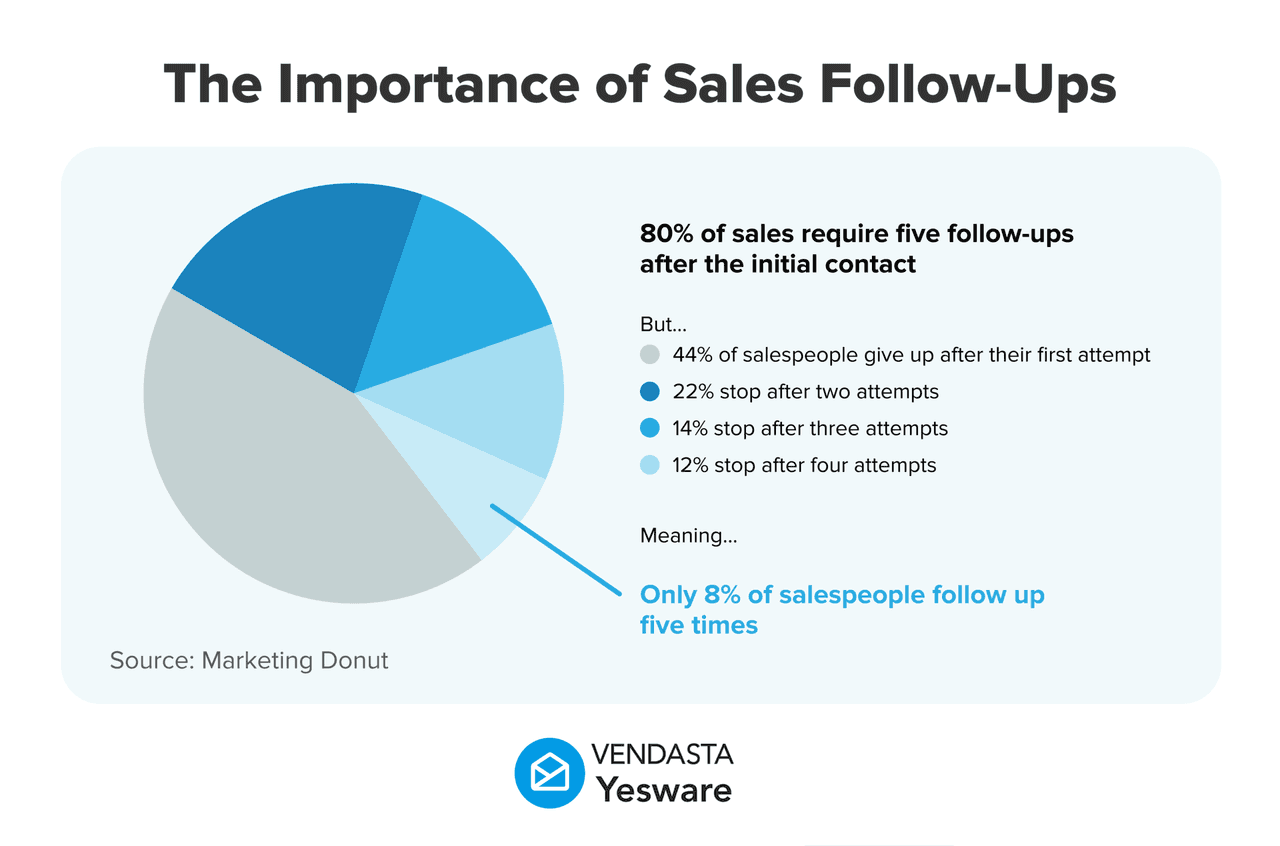
For small businesses with limited resources, automation tools reduce manual workload while ensuring no lead is forgotten. They are especially valuable for maintaining momentum across long sales cycles or high lead volumes.
Pipeline and Deal Tracking Tools
Pipeline and deal tracking tools give sales teams visibility into where each opportunity stands. These platforms help small businesses monitor deal stages, forecast revenue, and identify bottlenecks in the sales process.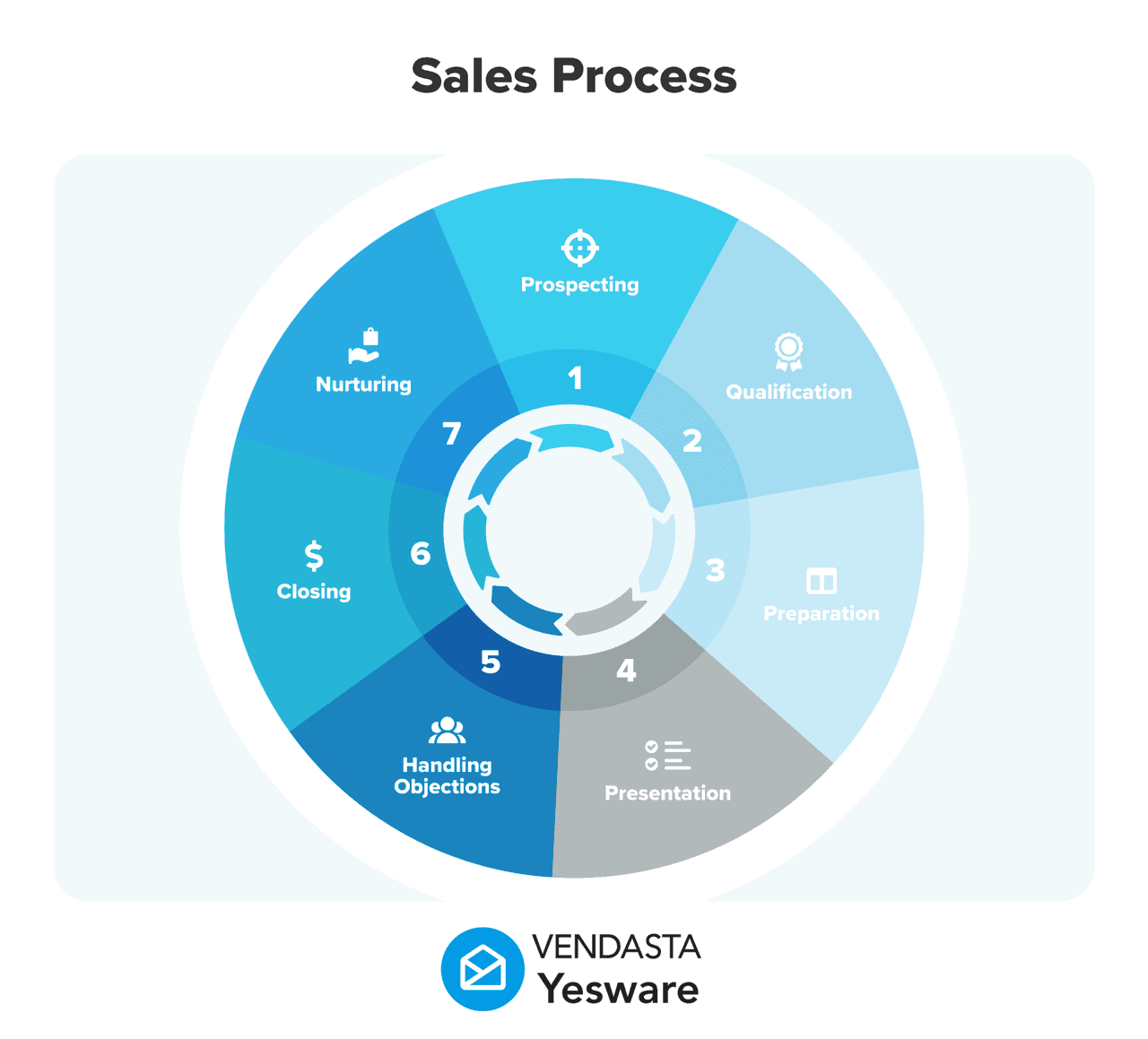
By visualizing the pipeline, small teams can prioritize the right opportunities, allocate time more effectively, and make more informed decisions about next steps.
Analytics and Reporting Platforms
Analytics and reporting tools help small businesses measure sales performance and understand what’s driving results. These platforms track metrics such as email engagement, activity volume, conversion rates, and pipeline movement.
With access to clear, actionable insights, sales teams can refine messaging, improve follow-up timing, and continuously optimize their sales strategy based on real data rather than guesswork.
Yesware’s Email Tools for Small Business Success
Yesware offers a full suite of features and tools for small business sales reps to keep in touch with their prospects and customers.
Open and Click Tracking
Our real-time email tracking capabilities give sales reps up-to-the-minute data about which emails are most engaging to their prospects using open rate and click-through rate (CTR) data.
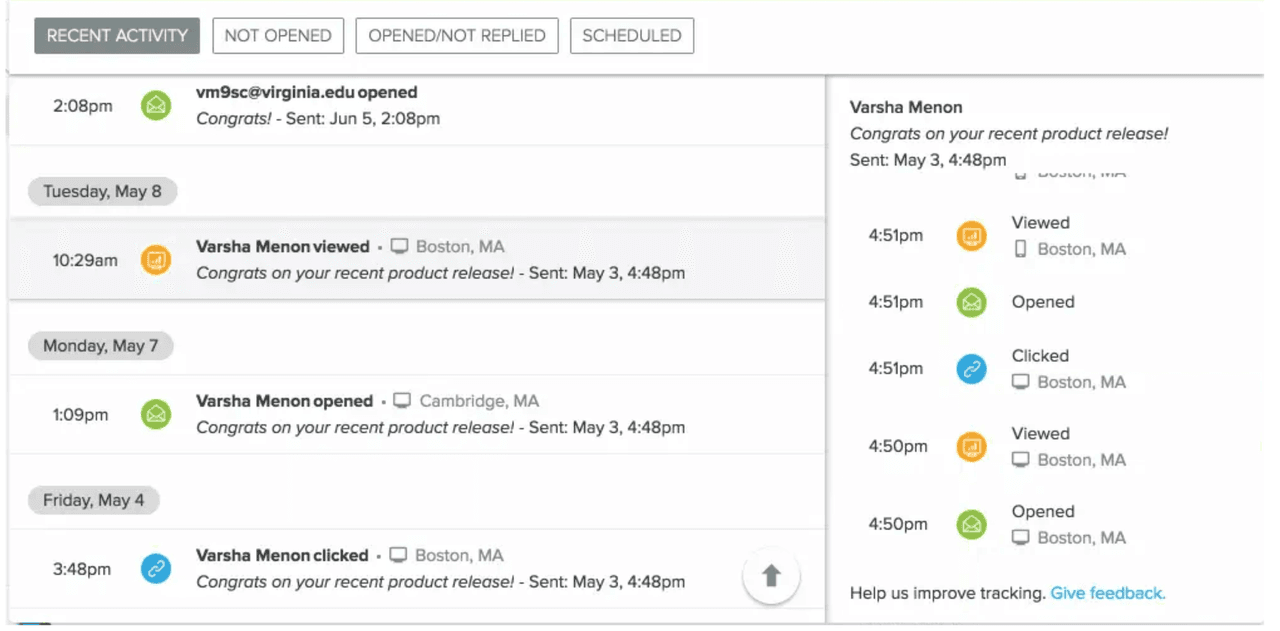
This way, sales reps can keep track of what happens to their emails after they hit send, allowing them to strategically plan for outreach and timely follow-up.
Our small business sales software gives sales teams the ability to add data to their decision-making process about how and when to reach out to leads and prospects.
Attachment Tracking
Yesware also gives users the ability to track attachments and other sales collateral (e.g. sales decks, presentations, etc.), with real data showing how often the documents are viewed and for how long.
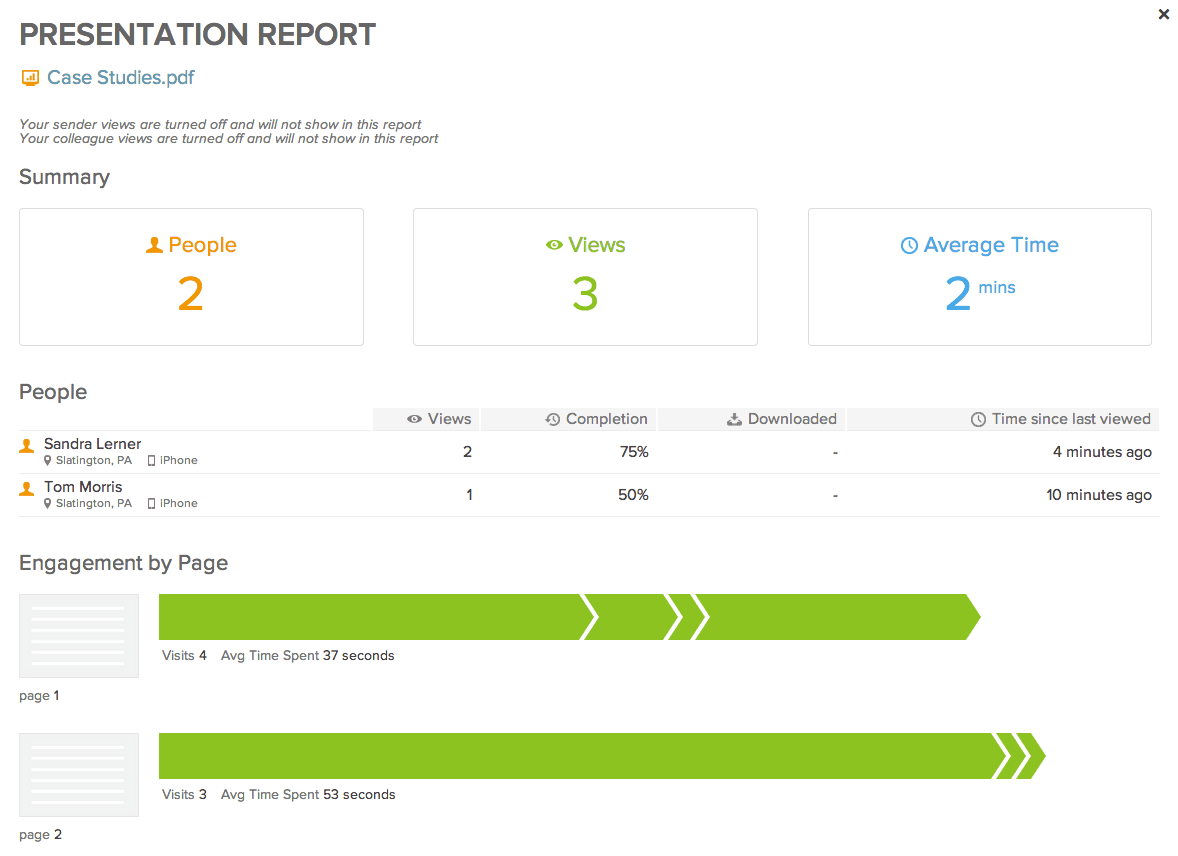
Not only does this data help with individual prospects and sales opportunities, but it also helps sales teams develop a deeper understanding of which content makes the biggest impact on their target audience as a whole. Before sharing sales decks, proposals, or other customer-facing documents, teams may also need to remove sensitive information. Teams should redact PDF files with Smallpdf before sending documents to prospects or customers to ensure confidential details are removed.
Plus, Yesware captures at-a-glance details for individual prospects that can be viewed directly within reps’ inboxes.
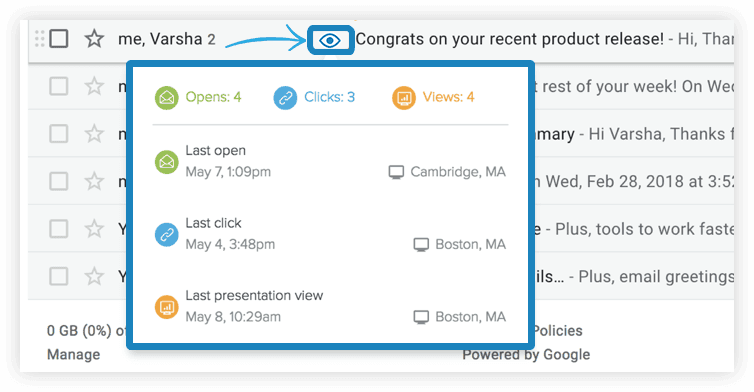
This gives sales reps the details they need right at their fingertips as they’re preparing to initiate a new interaction.
Personalized Templates
Yesware also gives users the ability to save and store proven, successful email templates.
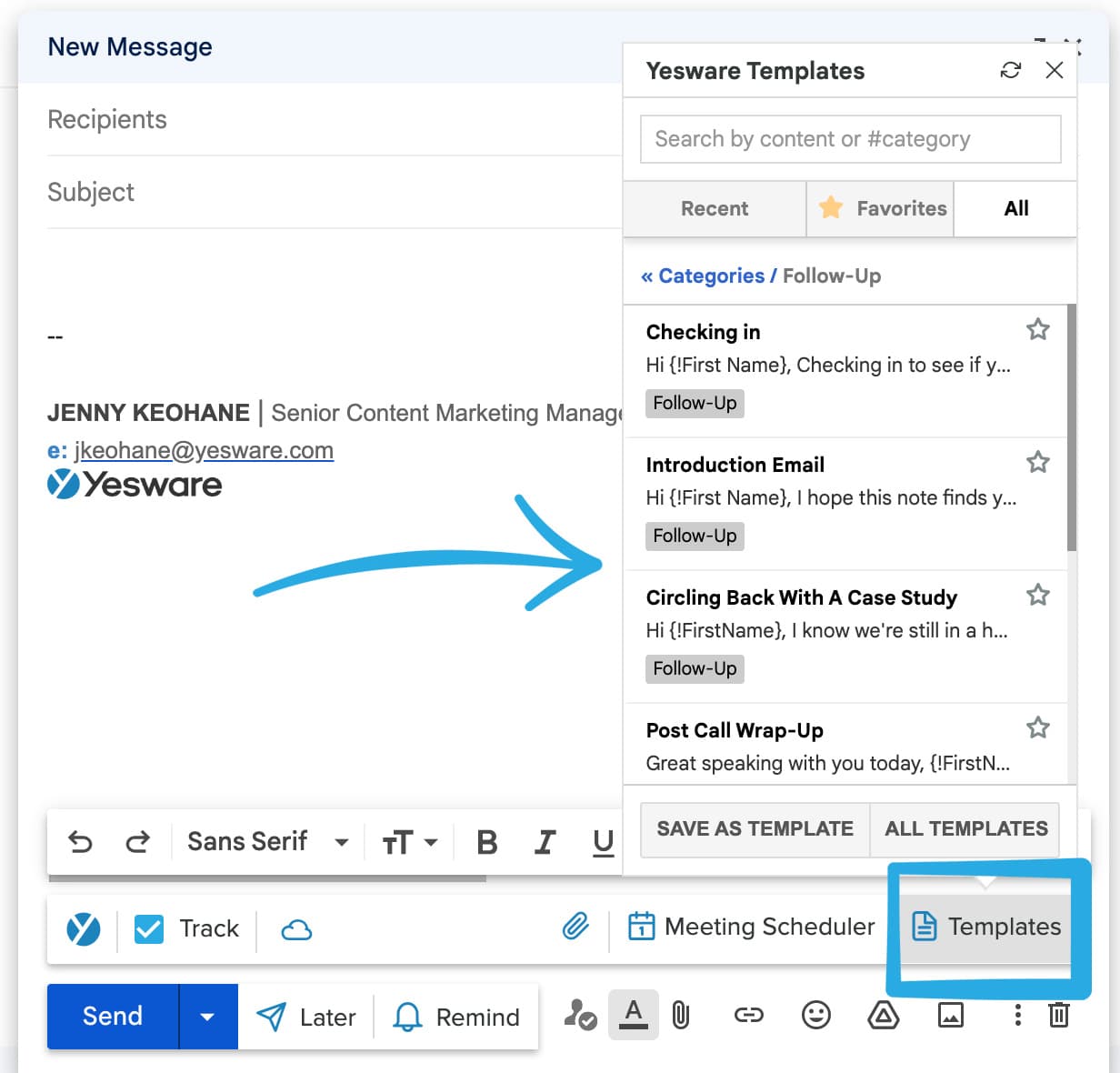
Plus, our software automatically tracks the results of each of your templates so you can stay on top of what’s working if and when your market’s preferences shift over time.
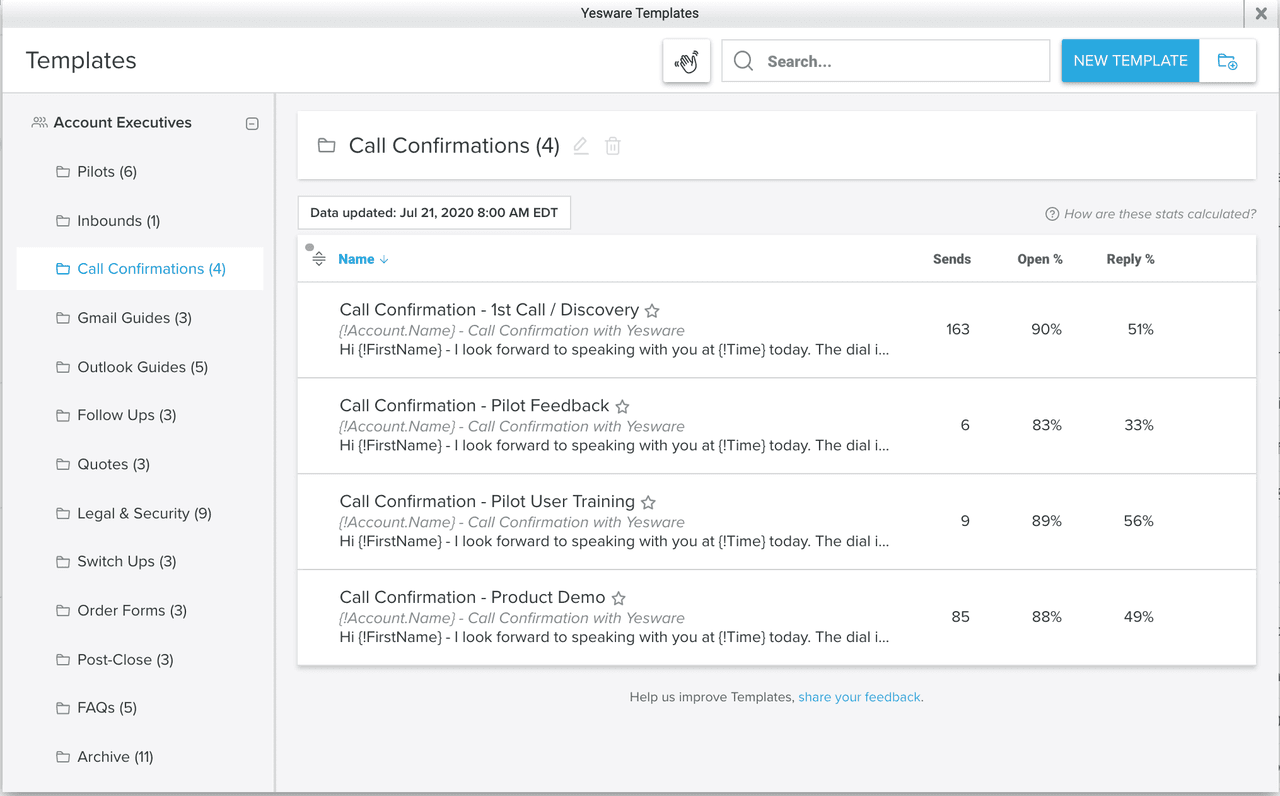
And all templates are fully customizable and highly personalized for targeted, strategic, relationship-oriented outreach.
Email templates help save time for small sales teams, for whom every minute and every resource counts.
It also helps ensure that messaging stays consistent, measurable, and scalable team-wide.
 Accelerate revenueSee a 3x increase in sales volume per rep
Multi-Touch Campaigns for Comprehensive Outreach
Another one of Yesware’s powerful features is its ability to help sales teams design and dispatch email campaigns that are:
- Multi-touch
- Omnichannel
- Personalized
- Automated/manual as needed
Our email campaigns give sales reps the power to nurture current leads — wherever they are in the sales pipeline — while continuing to initiate contact with new leads at the top of the funnel.
Automated Emails
Yesware makes automated emails fast, easy, and highly personalized. You can send a variety of touches in a variety of forms.
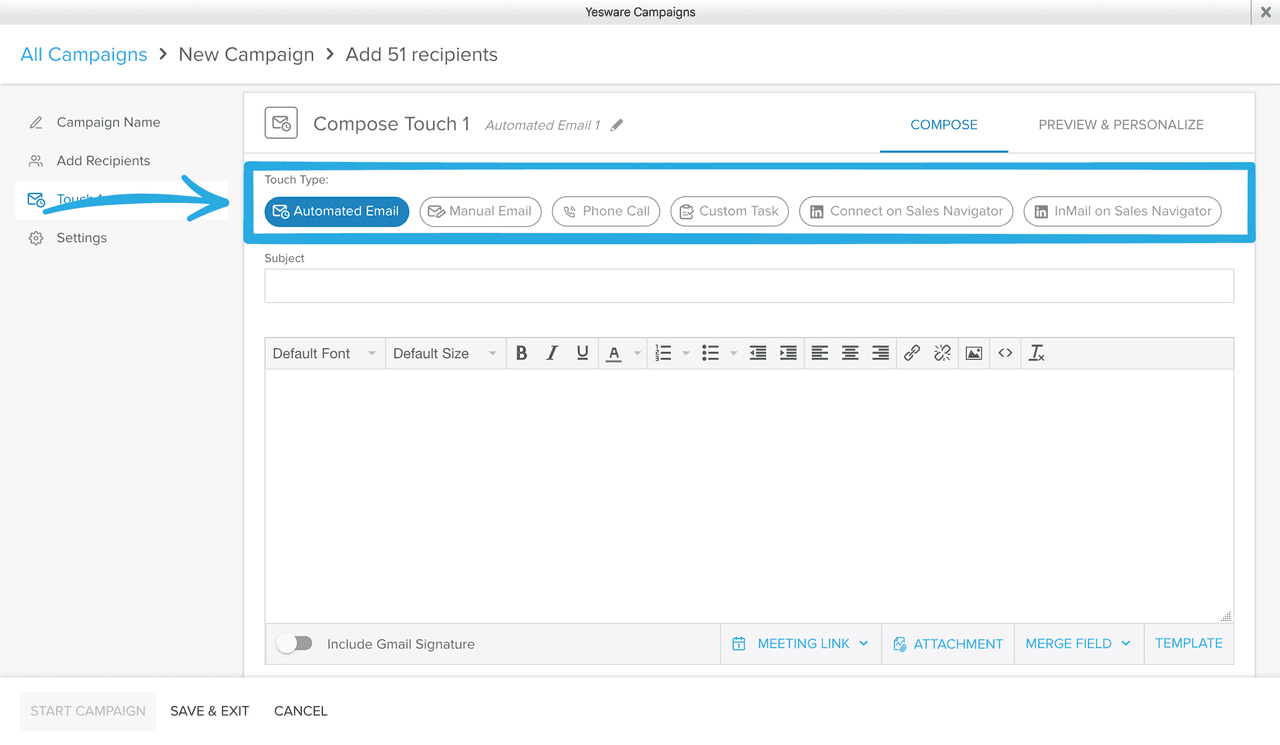
You can set a specific cadence for each touch by selecting the amount of days you’d like your next message to be delivered. If the recipient doesn’t reply or book a meeting, your follow-up emails will automatically be sent depending on the amount of time you set.
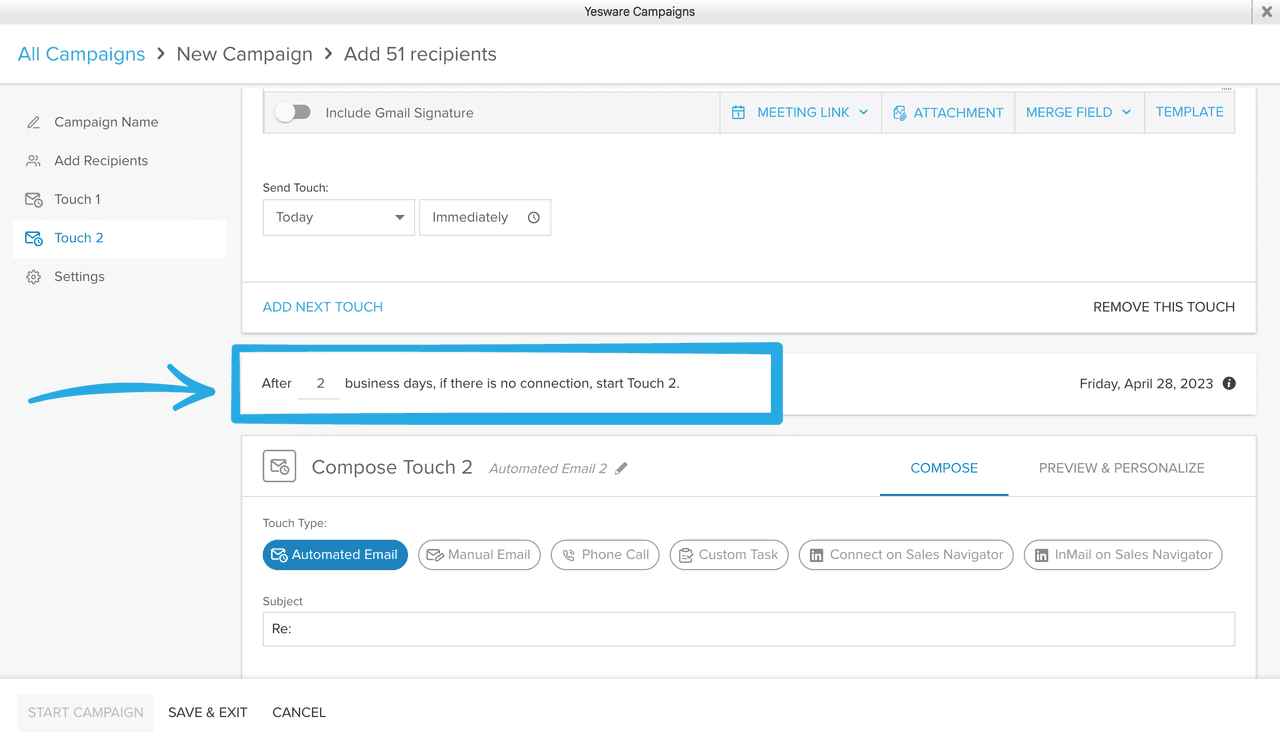
Sales reps can manage multiple workflows simultaneously with little to no manual intervention.
And with seamless integration with Salesforce, Yesware makes everything truly as automated as it can be.
Manual Emails
Yesware’s small business sales software also allows users to create emails and campaigns manually for times when an extra personalized touch is required.
While automation is a powerful and non-negotiable tool in today’s digital sales landscape, the ability to manually edit and/or create emails and campaigns is equally important.
Yesware’s combination of automated and manual email campaigns gives users the ability to be flexible and adaptable to different audience needs.
Phone Call Reminders
Multi-channel campaigns also allow users to add phone calls to their cadence, with automated reminders that keep reps on track with their timing.
The reminder populates in your Yesware sidebar, which is right inside your inbox:
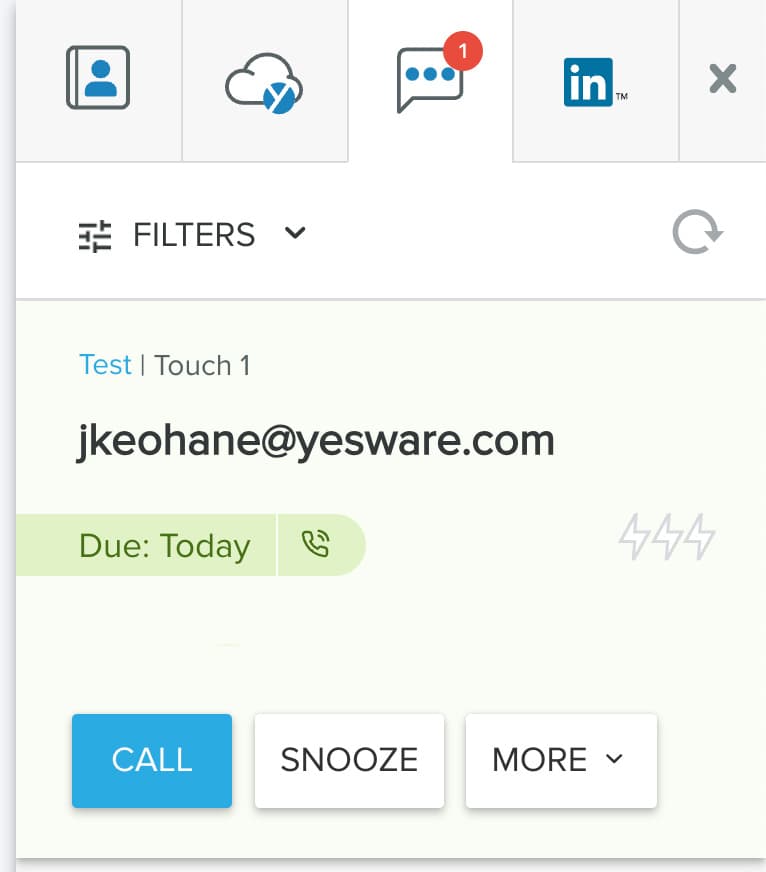
This feature helps sales reps strategically and seamlessly toggle between email outreach and phone interactions to keep prospects engaged and informed throughout the process.
LinkedIn InMails and Custom Touches
Similarly, Yesware users also have the ability to include LinkedIn messaging and other customized social media touches to create a truly comprehensive and all-reaching outreach campaign.
Sales reps can leverage Yesware’s various outreach capabilities to curate campaigns that are completely tailored to each individual prospect’s needs and preferences.
B2B Contact Data for Precision Targeting
Yesware’s newest feature, the Prospector tool, gives sales teams access to an enormous B2B lead database with enriched profiles for 100+ million contacts.
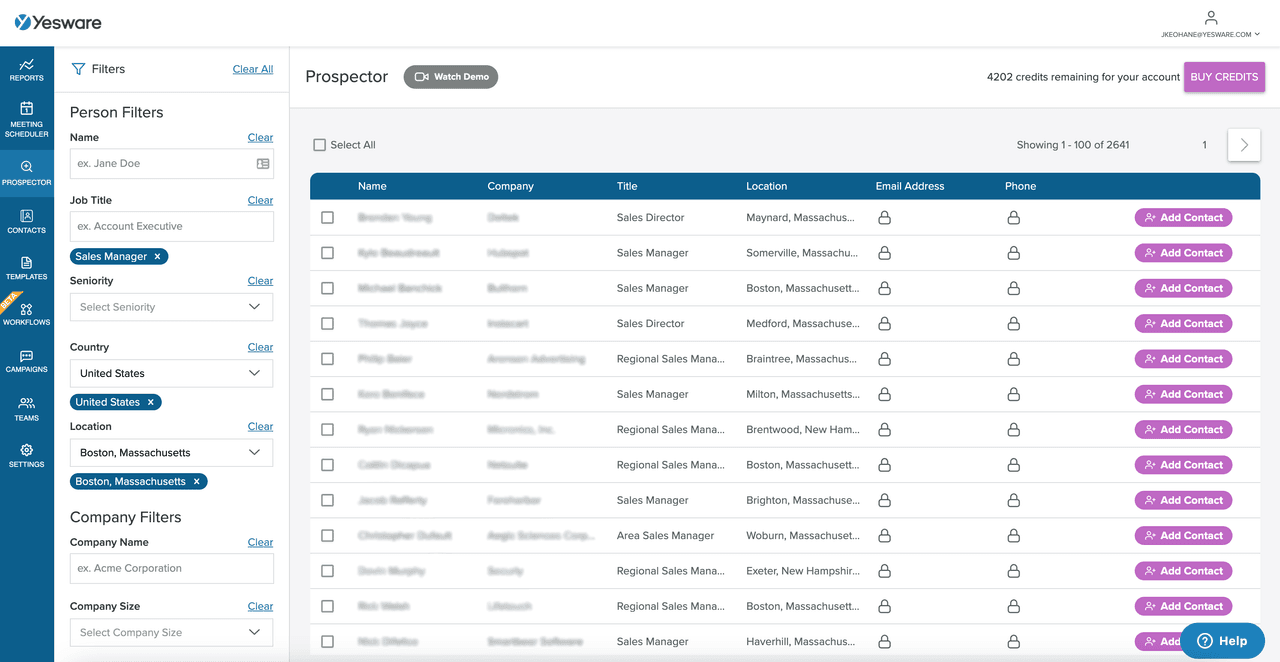
And with the ability to add relevant contacts in bulk to your CRM, Yesware makes it easy to scale your lead generation process.
It’s also worth noting here (because not all platforms are created equally in this regard) that Yesware is fully GDPR & CCPA-compliant. Your contacts’ data privacy must be the top priority, and Yesware ensures that it’s completely protected.
Meeting Scheduler for Seamless Coordination
Yesware’s Meeting Scheduler is integrated directly into your Outlook or Gmail inbox, making coordinating schedules fast and easy.
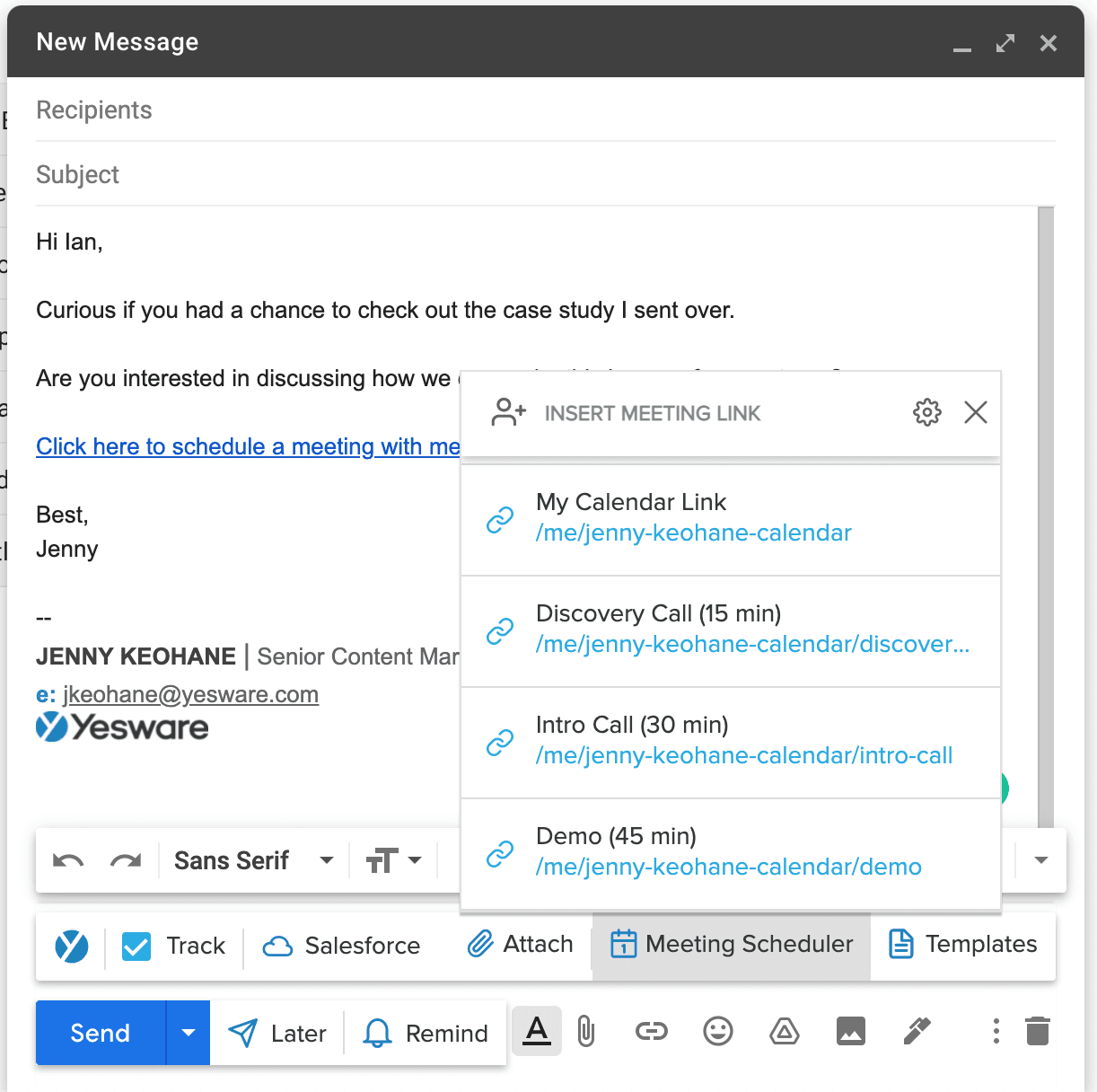
Simply keep your own calendar up to date, and recipients can see your availability and schedule their own appointment with the click of a link directly from within your email message — no back-and-forth required.
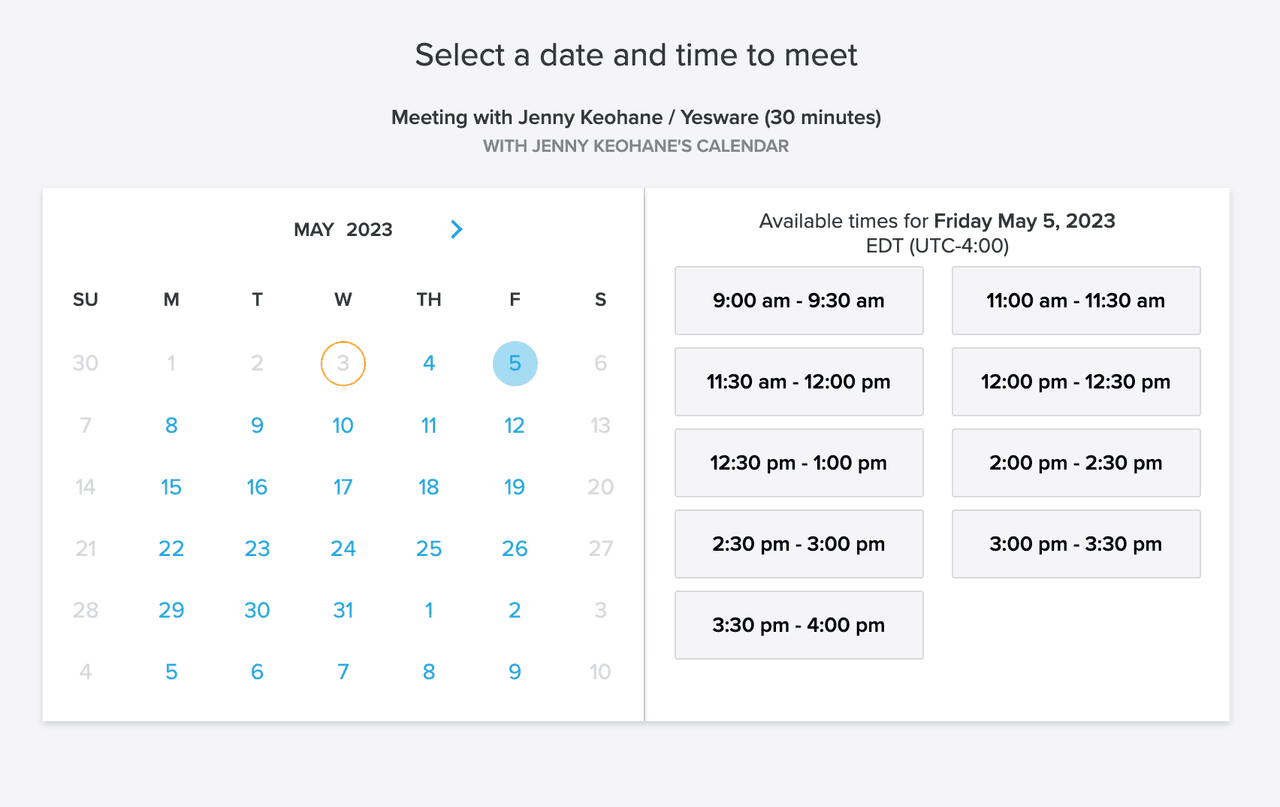
And with automated meeting confirmations and reminders, you’ll always stay on top of where you need to be next.
Yesware also gives sales reps space to prepare questions and notes on the back end, keeping everything contained in one streamlined, organized place.
Reporting and Analytics for Informed Decision-Making
Perhaps one of Yesware’s most impressive capabilities is its ability to track, measure, and draw insights from sales team’s and prospects’ behavior.
Our Reporting & Analytics tools give sales teams results on their email performance, campaign success, prospect engagement, and more, so they can make data-driven decisions about current and future outreach strategies.
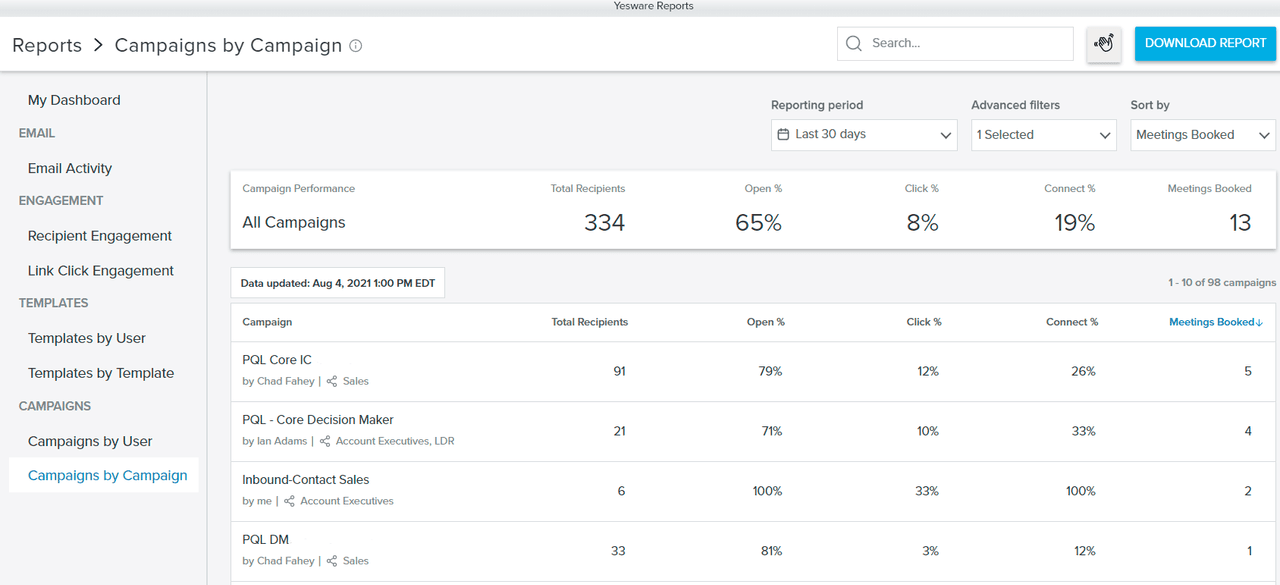
And with daily, weekly, monthly, and quarterly reporting time frames, sales reps can measure their day-to-day progress against big-picture goals.
Engagement data is one of the most powerful tools in a sales rep’s toolbox; the more sales reps understand about which prospects are most engaged, the more appropriately they can prioritize their resources.
Our reporting features can also help sales managers improve their sales forecasting.
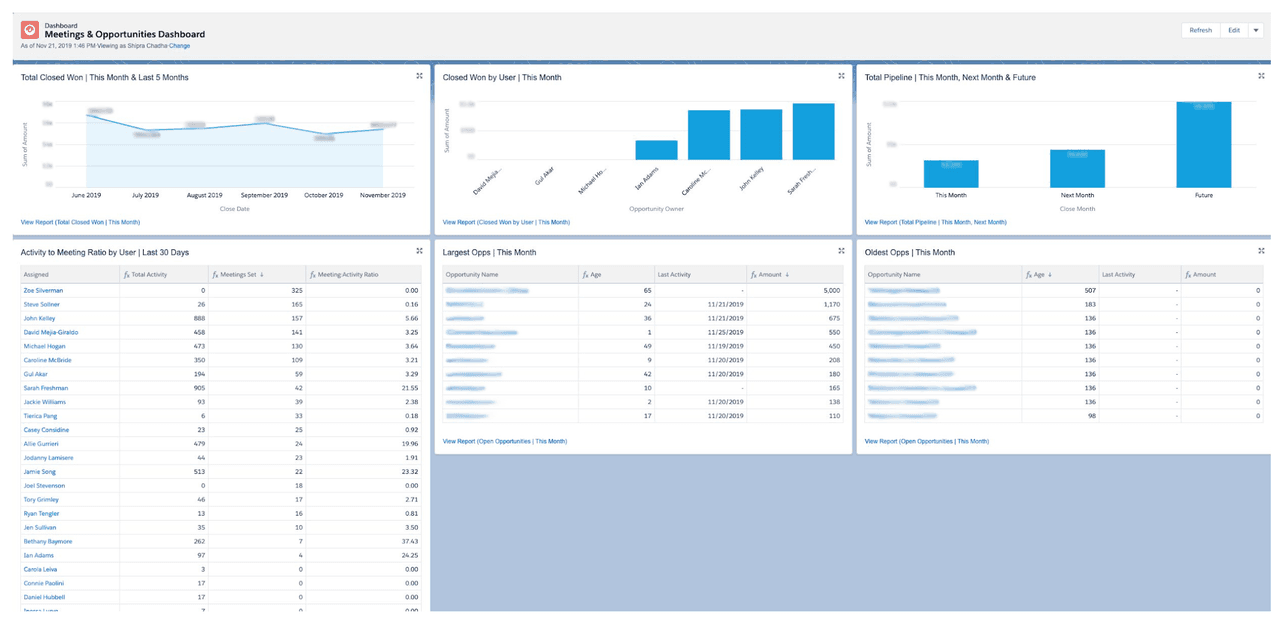
And all of these reports can be viewed based on individual sales reps, or based on the team’s results as a whole.
Tip: Looking for more ways to improve your small business sales process? Grab some of our favorite data-backed email findings below:
 Sales Engagement Data Trends from 3+ Million Sales ActivitiesLooking at millions of tracked email activity over the past few years, this ebook is filled with our top studies and findings to help sales teams accelerate results.
Cost-Effective Solutions Tailored for Small Businesses
Yesware was created to bridge the gap between the needs of small sales teams and large, complex enterprise software platforms.
With the option for a free “forever account,” as well as three pricing plans that max out at $65/month, Yesware is a highly affordable solution for teams hoping to execute personalized and automated outreach that can scale with them as they grow.
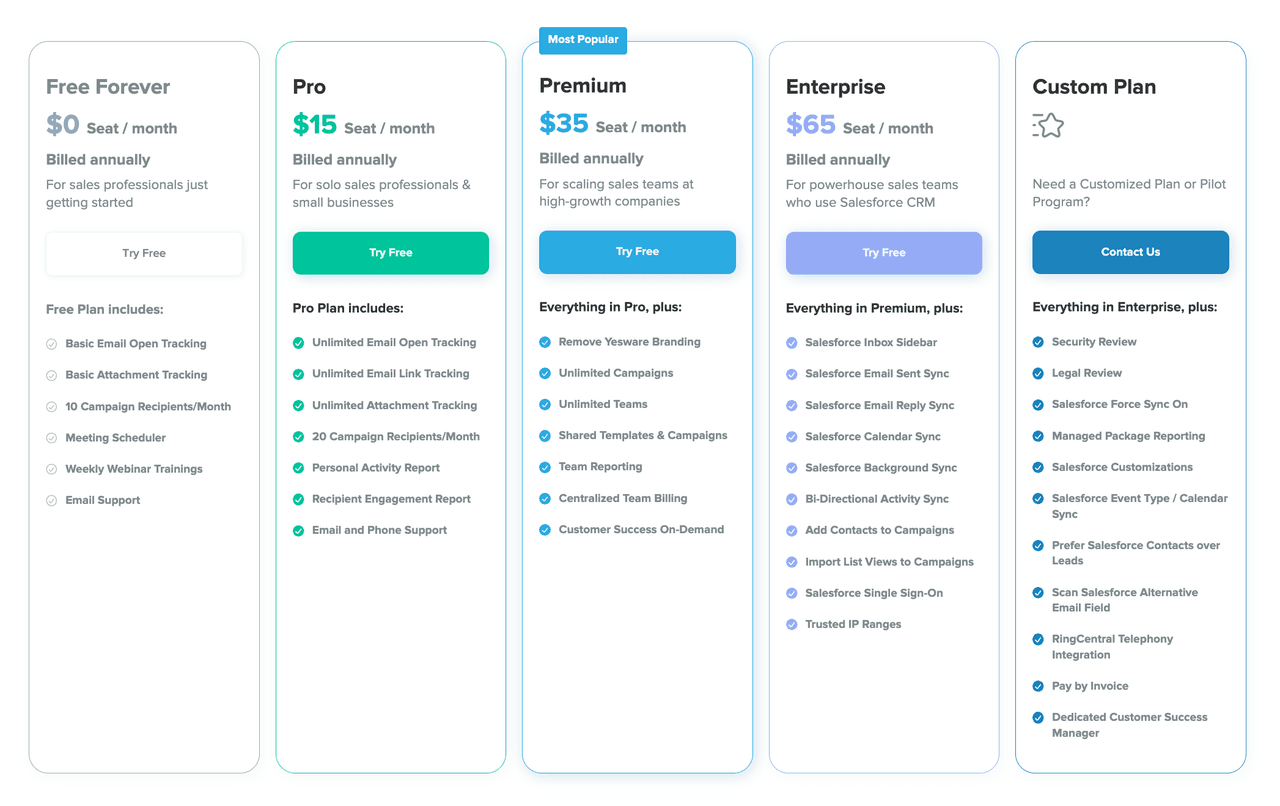
And, for teams that need something more or different, we also offer the ability to completely customize plans, features, and price points.
How to Choose Small Business Sales Software
Choosing the right small business sales software depends on your team’s size, sales process, and growth goals. While features and pricing vary widely, the most effective platforms share a few core characteristics that help small teams stay organized, efficient, and scalable.
Key Features to Prioritize
At a minimum, small business sales software should support contact management, outreach, and performance tracking. CRM functionality helps centralize prospect information and communication history, while automation tools reduce manual work by handling follow-ups and routine tasks. Analytics and reporting capabilities are equally important, as they give teams visibility into engagement, pipeline health, and overall performance.
The goal is not to choose the tool with the most features, but the one that delivers the most value for your specific sales workflow.
Pricing Considerations and Scalability
Budget is a major factor for small businesses, but cost should be evaluated alongside long-term scalability. Many platforms offer entry-level plans that work well for small teams but become expensive or restrictive as usage grows.
When evaluating pricing, it’s important to consider how costs will change as your team adds users, increases outreach volume, or needs more advanced functionality. Software that scales gradually with your business can help avoid disruptive platform changes later.
Integration With Existing Systems
Small business sales software should work seamlessly with the tools your team already uses. Email platforms, calendars, and CRMs are especially critical, as disconnected systems create data gaps and manual work.
Strong integrations allow sales activity to stay synchronized across platforms, ensuring accurate records, consistent reporting, and a smoother day-to-day experience for sales reps.
Ease of Use and Onboarding
Ease of use is one of the most important factors for small teams. Sales software should be intuitive enough to adopt quickly without extensive training or IT support.
Fast onboarding, minimal setup, and an interface that fits naturally into existing workflows help ensure the tool actually gets used. Software that’s easy to adopt delivers value faster and reduces the risk of low adoption across the team.
 The Optimal Technology Stack for B2B Sales TeamsUsing data from the most successful business-scaling models, we designed a blueprint for the exact technology your business needs at each phase of growth.
Trends Shaping Small Business Sales Software in 2026
As buyer expectations evolve and sales cycles become more data-driven, small business sales software is rapidly advancing to help teams work smarter, not harder. In 2026, innovation is centered on AI, automation, and deeper visibility across the sales process.
AI-Powered Insights and Recommendations
AI is becoming a core capability in sales software for small business. Instead of simply reporting on past activity, modern platforms are beginning to surface recommendations, such as who to follow up with, when to send a message, and which content is most likely to convert. This helps small teams prioritize effort without relying on guesswork.
Sales tracking software for small business is also using AI to identify engagement patterns across emails, links, and attachments, allowing reps to focus on prospects most likely to move forward.
Smarter Automation With Human Flexibility
Automation is moving beyond basic email sequences. In 2026, small business sales software is expected to offer more flexible automation that adapts based on prospect behavior. Automated workflows can pause, adjust, or escalate based on engagement signals, while still giving reps full control to step in manually when a more personal touch is needed.
This balance allows small business software sales teams to scale outreach without sacrificing relevance or authenticity.
Deeper Inbox and Workflow Integration
Sales tools are increasingly designed to live where sales reps already work. Inbox-first platforms continue to gain traction because they reduce context switching and speed up adoption. For small teams, tighter integration with email, calendars, and CRMs means less administrative work and more time spent selling.
This trend supports faster onboarding and higher usage, which is critical for realizing long-term value from sales software for small business.
Real-Time Analytics and Forecasting Improvements
Reporting is shifting from static dashboards to real-time, actionable insights. Sales tracking software for small business is evolving to provide clearer visibility into pipeline health, engagement trends, and forecast accuracy. These insights help small teams make faster decisions and adjust strategy before deals stall.
As analytics become more accessible and easier to interpret, small business sales software will play a larger role in guiding day-to-day sales execution, not just performance reviews.
Conclusion
Yesware is the all-in-one small business sales software that helps teams execute personalized, automated strategies at scale.
With features to enhance individual interactions and tools to help teams grow and manage the pipeline at large, Yesware has everything sales reps need to build relationships and connect with prospects in a way that moves deals forward.
It helps teams meet the immediate needs of the pipeline while staying on track with their long-term goals.
Noteworthy affordability, sophisticated features, and ease of use are what set Yesware apart from the rest.
Sign up for a free forever account with Yesware today.
Small Business Sales Software FAQs
1. What is small business sales software?
Small business sales software helps teams manage leads, track customer interactions, and streamline outreach in one place. It replaces manual spreadsheets and inbox-based workflows with tools for organization, automation, and visibility, making it easier for small teams to sell efficiently and consistently.
2. How does sales software for small business improve follow-ups?
Sales software for small business improves follow-ups by tracking prospect engagement and automating reminders or sequences. Tools like Yesware notify reps when emails are opened or links are clicked, helping teams follow up at the right time and focus on prospects showing real interest.
3. Do I need sales tracking software for small business if I already use email?
Yes. Sales tracking software for small business adds visibility email alone cannot provide. It shows which messages are opened, which links are clicked, and which prospects are engaged. Yesware works directly inside Gmail and Outlook, enhancing email without changing existing workflows.
4. What features should small business sales software include?
Effective small business sales software should include contact management, outreach automation, sales tracking, and reporting. Integrations with email and calendars are also important. Platforms like Yesware combine these features in an inbox-first experience, reducing complexity while supporting scalable sales processes.
5. How is small business sales software different from enterprise sales tools?
Small business sales software prioritizes simplicity, fast setup, and affordability. Enterprise tools often include advanced features that add cost and complexity. Yesware is designed for small and mid-sized teams that want powerful sales capabilities without long onboarding times or heavy administrative overhead.
6. Is sales software for small business worth it for small teams?
Yes. Even small teams benefit from sales software for small business because it reduces manual work and prevents missed opportunities. By automating follow-ups and centralizing data, tools like Yesware help small teams operate with the efficiency and consistency of much larger sales organizations.
7. How does sales tracking software for small business help prioritize leads?
Sales tracking software for small business shows which prospects are engaging with emails, links, and attachments. This insight helps reps prioritize warm leads over unresponsive ones. Yesware surfaces this engagement data in real time, making it easier to focus efforts where they matter most.
8. Can small business software sales tools scale as a company grows?
Many small business software sales tools are built to scale gradually. The right platform supports higher outreach volume, additional users, and more advanced reporting over time. Yesware offers flexible plans that allow teams to grow without switching tools or disrupting established workflows.
9. How long does it take to set up small business sales software?
Setup time varies by platform, but many modern tools are designed for quick onboarding. Yesware can be installed in minutes and works directly inside Gmail or Outlook, allowing sales teams to start using small business sales software almost immediately without IT involvement.
10. Does small business sales software replace a CRM?
Not always. Some small business sales software complements an existing CRM by improving outreach and engagement tracking. Yesware integrates with Salesforce and other systems, syncing activity automatically so teams get better visibility without replacing the tools they already rely on.
This article was originally published in March 2024 and was updated in January 2026 to include the latest information and insights.
Get sales tips and strategies delivered straight to your inbox.
Yesware will help you generate more sales right from your inbox. Try our Outlook add-on or Gmail Chrome extension for free, forever!
Related Articles



Anya Vitko

Casey O'Connor

Casey O'Connor
Sales, deal management, and communication tips for your inbox