Automated Email Follow-Up: The Complete Guide to More Replies



Anya Vitko
Contents
- TL;DR
- What Is Automated Email Follow-Up? (And Why It Matters)
- Why Automated Email Follow-Up Dramatically Increases Sales Performance
- How Automated Email Follow-Up Works: A Step-by-Step Breakdown
- The Best Automated Email Follow-Up Software in 2026
- How to Set Up Automated Email Follow-Up in Yesware (In Under 30 Minutes)
- 7 Proven Best Practices for Automated Follow-Up Emails That Get Replies
- Common Mistakes That Kill Your Automated Follow-Up Results
- The Bottom Line
- Automated Email Follow-Up FAQs
You send a great cold email. You craft the subject line, nail the opening, make a clear ask. Then you wait.
No reply.
Three days pass. You remember to follow up this time. You write something quick, send it, and move on to the next prospect. By the time a second follow-up would have been due, you’ve already forgotten. The deal dies without a “no.” It just disappears.
This isn’t a pitch problem. It’s a follow-up problem. And it’s costing sales teams more deals than they realize.
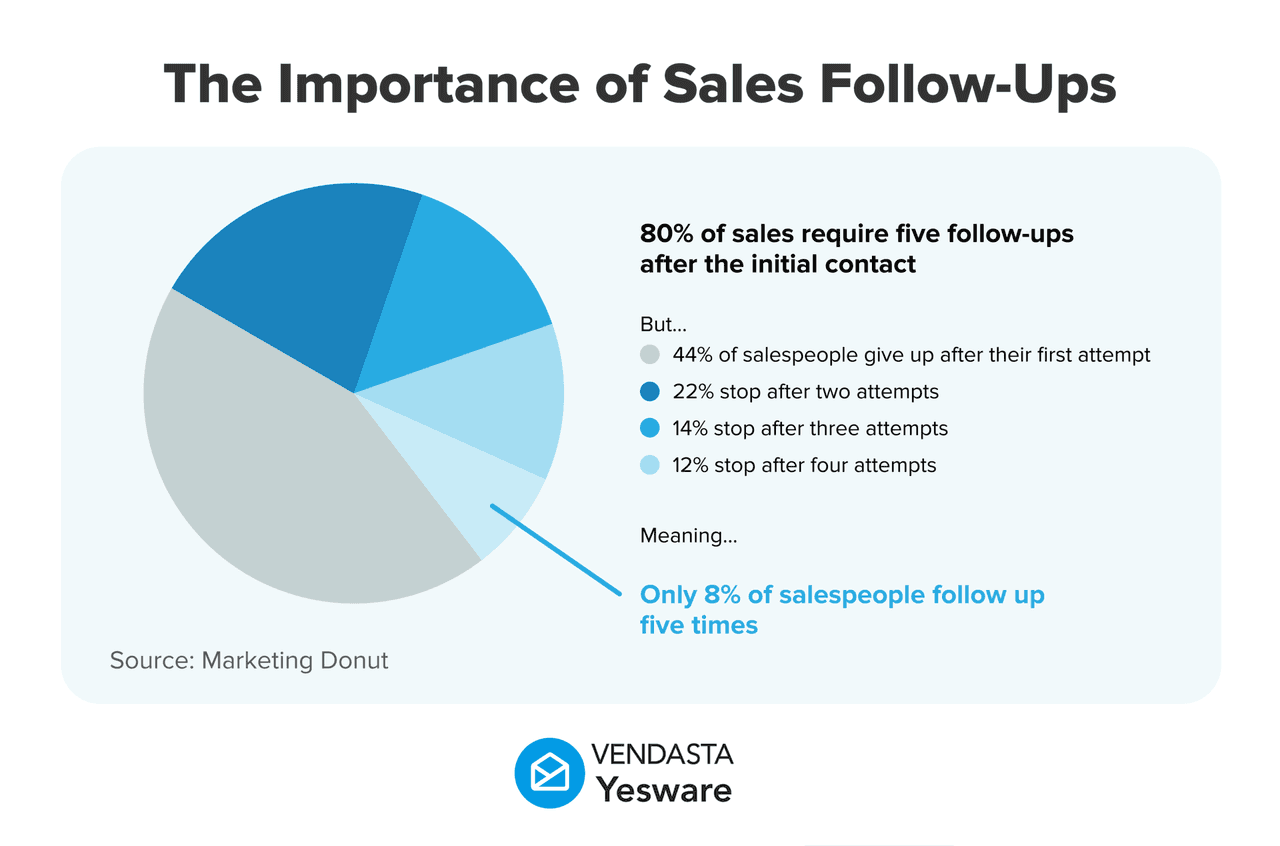
Here’s the reality: 80% of sales require at least 5 follow-up touches, yet 44% of reps give up after just one. Meanwhile, the reps hitting quota aren’t working harder. They’ve automated the follow-up process so nothing falls through the cracks.
Automated email follow-up solves the consistency problem. You write your emails once, set the sequence, and the system handles the rest, sending the right message at the right time, every time, without you lifting a finger after setup.
TL;DR
- 80% of sales need 5+ follow-up touches, but most reps stop at one. Automated sequences close that gap without adding to your workload.
- The best follow-up emails are short (50–125 words), behavior-triggered, and personalized. Automation makes this repeatable at scale.
- Yesware is the top pick for sales teams who want powerful campaign automation directly inside Gmail or Outlook, with no complex setup required.
 Connect with more buyersBuild valuable business relationships faster
What Is Automated Email Follow-Up? (And Why It Matters)
Automated email follow-up is a pre-configured sequence of emails that sends automatically based on specific triggers, like a set number of days passing with no reply, a prospect opening your email without responding, or a link being clicked.
You write the emails once. You set the rules. The system handles delivery.
This is not a bulk marketing blast. Automated follow-up emails in a sales context are personalized, 1:1 messages that appear to come directly from the rep. They reference the prospect by name, speak to their specific situation, and adjust based on behavior. The difference between automated follow-up and a mass newsletter is the same as the difference between a personal letter and a flyer stuffed in a mailbox.
Sales reps, SDRs, account executives, account managers, recruiters, and founders all use follow-up email automation to stay top-of-mind with prospects without constantly monitoring a spreadsheet.
Here’s what a basic four-touch automated sequence looks like in practice:
| Day | Action | Trigger |
|---|---|---|
| Day 0 | Initial outreach email sent | Manual send or campaign start |
| Day 3 | Follow-up #1 auto-sends | No reply received |
| Day 7 | Follow-up #2 auto-sends | Still no reply |
| Day 14 | Break-up email auto-sends | Still no reply |
| Any day | Sequence pauses automatically | Prospect replies or books a meeting |
Personalization matters at every step. Research from Experian found that personalized emails generate 6x higher transaction rates than non-personalized messages. The goal of automated follow-up email systems isn’t to remove the human element. It’s to make sure that human element shows up on time, every time.
Automated Follow-Up vs. Manual Follow-Up: What’s the Difference?
Manual follow-up isn’t just slow. It’s unpredictable. One rep follows up religiously; another forgets for two weeks. One prospect gets four thoughtful touches; another gets a single email and then silence. That inconsistency costs deals, and most teams don’t even track how often it happens.
HubSpot research found that sales reps spend 21% of their day writing emails. That’s nearly two hours daily on a task that automation could handle in minutes. Time reclaimed from repetitive email writing goes back into calls, demos, and real relationship-building in sales, the activities that actually move deals forward.
| Factor | Manual Follow-Up | Automated Follow-Up |
|---|---|---|
| Time to execute | 15–30 min per sequence | Minutes to set up, zero ongoing effort |
| Consistency | Varies by rep | Always on schedule |
| Scalability | Limited to rep bandwidth | Scales to hundreds of prospects |
| Personalization | High (but time-consuming) | High (with merge tags + dynamic fields) |
| Performance data | None or manual tracking | Built-in analytics |
| Risk of being forgotten | High | None |
Automation doesn’t replace the human element in sales. It removes the friction that prevents that human element from showing up consistently.
Why Automated Email Follow-Up Dramatically Increases Sales Performance
The business case for follow-up email automation comes down to simple math. If following up more often leads to more replies, and automation makes following up effortlessly consistent, the ROI is straightforward.
Yesware’s own research found that reps who send 9 follow-up emails see reply rates up to 9x higher than reps who send just one. The optimal range is 4 to 9 touches for most cold outreach sequences. Most reps never get there manually.
There’s also a psychological dimension worth understanding. Persistent follow-up isn’t annoying; irrelevant follow-up is. Buyers are busy. An email that arrives at the right time, references something specific to their situation, and asks for one clear thing reads as helpful, not pushy. Automation makes that kind of consistency achievable for every prospect in your pipeline, not just the ones you happen to remember.
Timing Is Everything, And Automation Gets It Right
Timing has a measurable impact on email open and reply rates. Studies from CoSchedule and HubSpot consistently point to Tuesday and Wednesday mornings, specifically between 9 and 11 a.m. in the recipient’s time zone, as the highest-performing windows for sales emails.
Manual follow-up rarely hits that window reliably. A rep finishing a call at 4:30 p.m. on a Friday sends the follow-up when it’s convenient for them, not when it’s optimal for the prospect. Automated systems can be configured to send within the ideal time window every time, accounting for time zones automatically. Setting up scheduled email reminders for follow-up tasks is one way reps bridge the gap before they move to full sequence automation.
Some more advanced tools also offer AI-powered send-time optimization, learning from engagement data to determine the best time to reach each individual prospect. This is a feature worth looking for when evaluating automated email follow-up software.
Consistency Builds Pipeline Predictability
When every prospect goes through the same quality sequence, pipeline behavior becomes more predictable. Sales managers can look at engagement rates across a sequence and forecast with greater confidence, rather than guessing which deals are moving and which ones went cold because a rep dropped the ball.
Automated follow-up email sequences also level the playing field across your team. Your best rep’s process isn’t locked inside their head. It’s a template any rep can use. That’s how automation turns individual excellence into team-wide performance. If you’re looking to sharpen the broader view of how your team is progressing, tracking the right key sales metrics alongside your sequence data gives you the full picture.
The Data Advantage
Manual follow-up leaves you guessing. You don’t know which subject line got the most opens, which email in the sequence drives the most replies, or which template converts prospects into booked meetings. You operate on instinct.
Automated email follow-up systems track everything: open rates, click rates, reply rates, meeting booked rates, and sequence completion rates. That data tells you what’s working and what to cut. Tools that also support email attachment tracking go even further, showing you which documents prospects actually opened and spent time reviewing.
Yesware customers using campaign automation can see which templates are driving opens and replies across the entire team. That means reps aren’t starting from scratch every time they write an outreach email. They’re building on what’s already proven to work. Teams using Yesware’s engagement and campaign reports have reported increasing email open rates by 20–30% and reply rates by up to 32% by identifying and replicating top-performing messaging.
For a deeper look at how email timing, follow-up frequency, and engagement patterns play out across millions of real sales activities, download the free ebook:
 Sales Engagement Data Trends from 3+ Million Sales ActivitiesLooking at millions of tracked email activity over the past few years, this ebook is filled with our top studies and findings to help sales teams accelerate results.
How Automated Email Follow-Up Works: A Step-by-Step Breakdown
Setting up a follow-up email automation sequence isn’t complicated, but the quality of your setup determines the quality of your results. Here’s how to do it right, from goal-setting to ongoing optimization.
Step 1: Define Your Sequence Goal
Before writing a single email, clarify what this sequence is designed to accomplish. The goal shapes everything: the number of touches, the tone, the cadence, and the ask. It also helps to understand where each sequence fits within your broader sales cycle, since the right follow-up approach looks different at each stage.
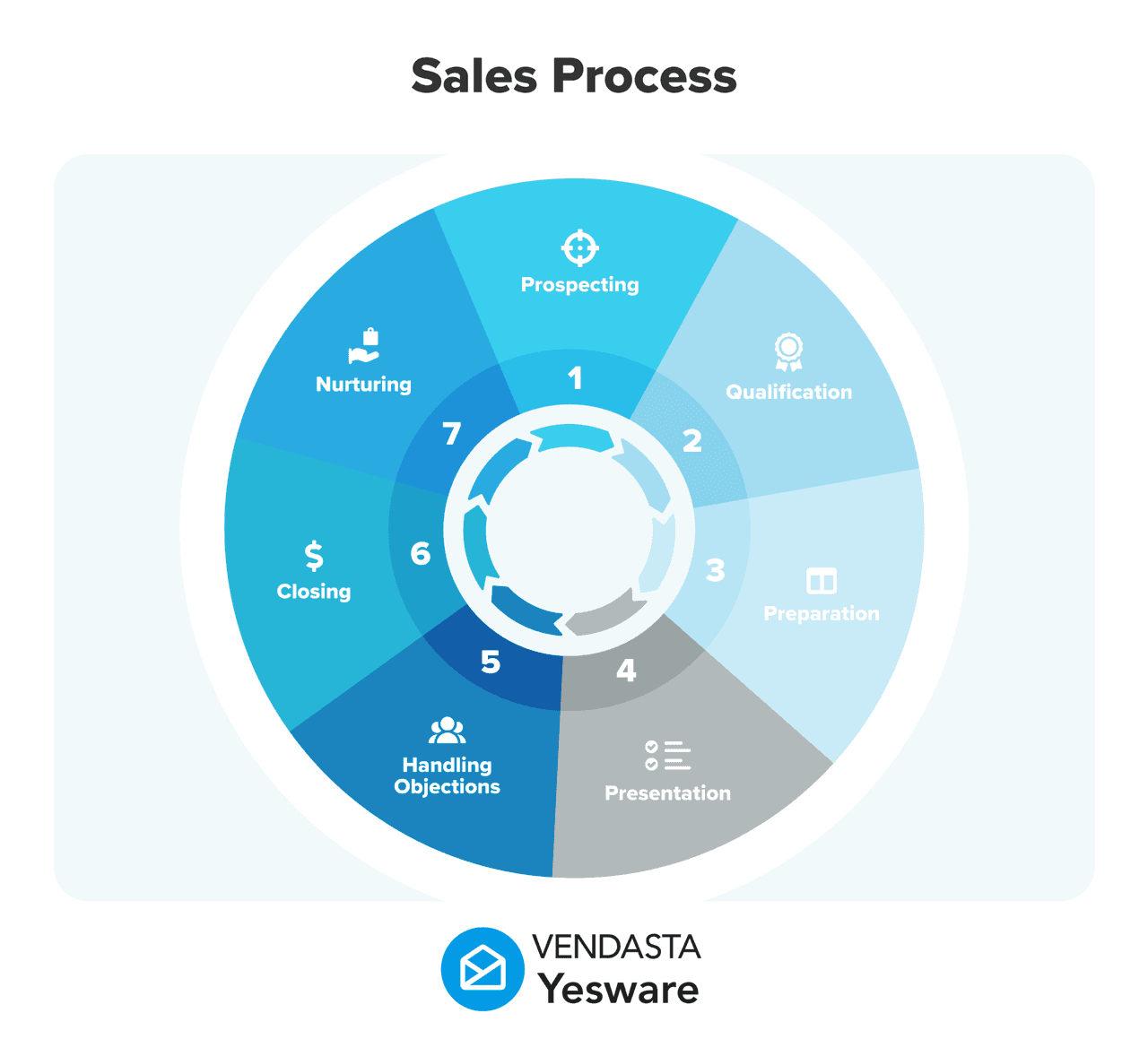
Common sequence types and their typical structures:
- Cold outreach: 6–8 touches over 3 weeks. The goal is a first conversation, whether a call, demo, or discovery meeting.
- Post-demo follow-up: 3–4 touches over 10 days. The goal is moving a warm prospect to a proposal or next step.
- Re-engagement: 2–3 touches over 2 weeks. The goal is reviving a deal that went quiet.
- Proposal follow-up: 3–5 touches over 2 weeks. The goal is getting a decision on a pending proposal.
A cold outreach sequence and a post-demo sequence should look and feel completely different. Defining the goal first keeps you from writing generic emails that don’t fit the moment.
Step 2: Write Your Email Templates
Write every email in the sequence before you configure anything. Trying to build and write at the same time leads to sloppy templates.
Here’s a framework for structuring a five-touch cold outreach sequence:
- Email 1: Value-led, light ask (or no ask). This is essentially your introduction email. Focus on who you are, why it’s relevant to them, and what you can offer before asking for anything.
- Email 2: Add a new angle, whether a stat, a specific problem, or an insight they haven’t heard yet.
- Email 3: Social proof. Name a customer they’d recognize, share a relevant outcome, or reference a case study.
- Email 4: Suggest a different channel, such as a quick call, a LinkedIn message, or a short video. Switching formats can break through where email hasn’t.
- Email 5 (break-up): Be direct. “I’ll stop reaching out, but if [problem you solve] ever becomes a priority, I’d be glad to connect.”
Keep subject lines short; four to seven words performs best. Use merge tags for personalization from the start: {{first_name}}, {{company}}, {{industry}}.
Follow-up emails with 50–125 words consistently outperform longer ones. (Boomerang research) If your draft is longer than three short paragraphs, cut it.
Step 3: Set Your Triggers and Timing
Triggers define when each email in the sequence sends. There are two main types:
- Time-based triggers: The email sends X days after the previous one, regardless of whether it was opened. Simple to configure and good for most sequences.
- Behavior-based triggers: The email sends or doesn’t send based on what the prospect did. Opened but didn’t reply? Send a follow-up. Clicked a link? Trigger a different email. More advanced, but significantly more relevant.
Always set exit conditions. When a prospect replies or books a meeting, they should be removed from the sequence automatically. Continuing to send follow-up emails to someone who already responded damages your relationship and your sender reputation.
Step 4: Personalize at Scale
Basic merge tags handle first name and company. The most effective sequences go further.
Reference something specific: a recent funding round, a job posting that signals a pain point, a LinkedIn post the prospect published, or a mutual connection. This level of detail turns an automated email into something that reads like you actually did your homework, because you did, once, and the system delivers it reliably every time.
Tools like Yesware support custom variables that let reps add unique details per prospect at the sequence level, so personal selling at scale is achievable without requiring manual rewrites for every contact.
Step 5: Launch, Monitor, and Optimize
Once your sequence is live, the work isn’t done. It’s shifted from writing to reviewing.
In the first two weeks, watch these four metrics closely:
- Open rate: Are subject lines getting through? Below 30% warrants a test.
- Reply rate: Are emails driving responses? Below 5–8% on cold outreach means content may need work.
- Unsubscribe rate: Above 0.5% is a signal to review frequency or relevance.
- Sequence completion rate: How many prospects make it to the final email? Low completion often means something earlier in the sequence is prompting opt-outs.
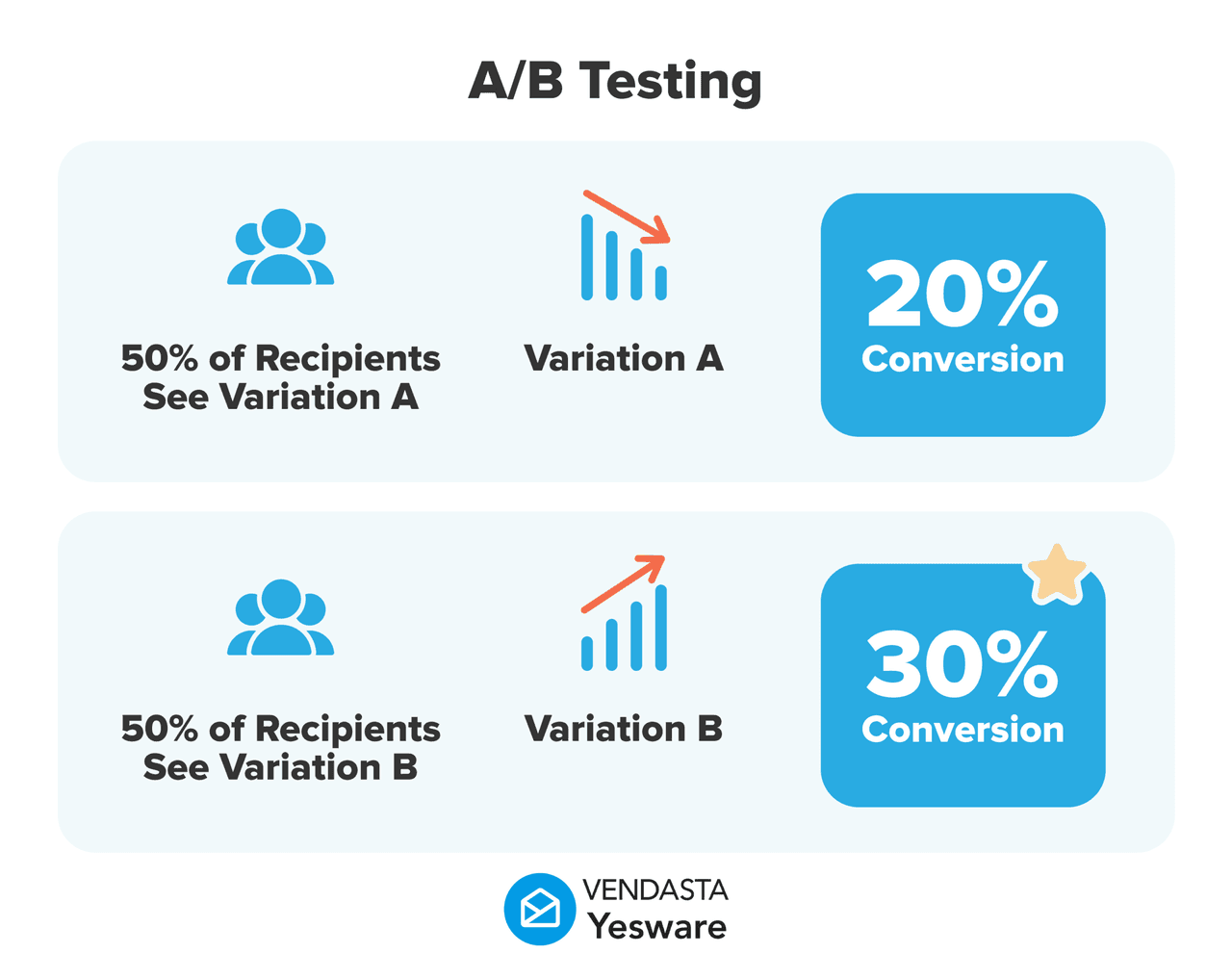
Optimization is an ongoing process. A/B test subject lines. Try shorter emails. Adjust spacing between touches. Every 30 days, look at what the data is telling you, not what you assumed when you built the sequence.
The Best Automated Email Follow-Up Software in 2026
Not every automated email follow-up tool is built for sales. Some are marketing platforms that bolt on sequencing as an afterthought. Others are so bloated with features that setup takes weeks. The best tools for sales reps live inside your inbox, where selling already happens, and get out of the way.
Here are the top solutions, ranked and compared.
1. Yesware — Best for Sales Teams Who Live in Their Inbox
Yesware is a sales engagement platform that works directly inside Gmail and Outlook. There’s no separate dashboard to manage, no new software to learn, and no IT department required to get started. The install takes about 60 seconds, and most reps have their first automated sequence running the same day.
Yesware’s campaign automation lets you build multi-touch follow-up sequences with behavior-based triggers. Emails send or pause automatically based on whether a prospect opened your message, clicked a link, or replied. Merge tags and custom fields handle personalization at scale. Real-time tracking shows you the moment a prospect opens your email, so you can follow up while the conversation is still warm.
Key features for automated follow-up:
- Multi-touch campaign automation with customizable sequences
- Behavior-based triggers that pause automatically on reply or meeting booked
- Reusable email template library, shared across the team
- Custom variables for true 1:1 personalization at scale
- Real-time open and click notifications
- Campaign analytics: open rates, reply rates, template performance, all in one place
Yesware is built for sales teams that want enterprise-level automation without the enterprise-level price tag or complexity. Paid plans start at $15/user/month, and there’s a free forever plan to try the core features before committing.
Best for: SDRs, AEs, and sales managers at growing companies who want a simple, effective tool that works where they already sell.
2. Outreach — Best for Large Enterprise Sales Teams
Outreach is a full-scale sales execution platform with deep sequence automation, AI-driven insights, and extensive CRM integrations. For large organizations with dedicated RevOps support, it covers a lot of ground: multi-channel sequences spanning email, phone, and LinkedIn; revenue intelligence; conversation intelligence; and forecasting tools.
That breadth comes with trade-offs. Outreach carries a steep learning curve, typically requires admin setup and onboarding support, and runs at $100+/user/month. For teams with the resources to implement and manage it, it’s a capable platform. For teams that want to get up and running fast, it can feel like overkill.
Best for: Sales organizations with 50+ reps and a dedicated RevOps or sales ops function.
3. Salesloft — Best for Revenue Teams Focused on Cadences
Salesloft is a cadence-based sales engagement platform with strong automation and coaching functionality. It’s well-suited to teams that want to standardize outreach workflows across large rep teams, with features like call recording, deal intelligence, and team-level analytics built in.
After merging with Drift, the platform now includes conversational marketing features alongside its core sales engagement tools. Pricing sits at the enterprise tier, making it a harder sell for smaller or leaner teams.
Best for: Mid-market to enterprise B2B teams that need both outreach cadence management and sales coaching tools in one platform.
4. Apollo.io — Best for Prospecting + Follow-Up in One Tool
Apollo combines a B2B contact database with outreach automation, a practical choice for teams that want to find prospects and sequence them in a single platform. With over 275 million contacts and built-in sequencing, LinkedIn integration, and a dialer, it’s a high-volume outbound tool.
The trade-off is data quality variability and deliverability challenges at scale. Apollo works well for teams with a strong grasp of list hygiene and sending best practices. Without those guardrails, high-volume sending can hurt sender reputation quickly.
Best for: Teams doing high-volume cold outreach that need prospecting data and automation in a single tool.
5. Lemlist — Best for Hyper-Personalized Cold Email
Lemlist built its reputation on image and video personalization inside cold emails, including personalized screenshots, dynamic images with the prospect’s logo or name embedded, and personalized video thumbnails. For outbound teams that want to stand out in crowded inboxes, it’s a differentiated approach.
Lemlist doesn’t have the breadth of a full sales engagement platform, but it covers the essentials: multi-channel sequences, A/B testing, and basic analytics. It’s a strong fit for smaller teams or founders doing highly creative outbound campaigns.
Best for: Small teams and founders who want to stand out with creative, visually personalized cold outreach.
Automated Email Follow-Up Software: Side-by-Side Comparison
| Tool | Starting Price | Best For | Gmail/Outlook Integration | Behavior-Based Triggers | Built-in Analytics |
|---|---|---|---|---|---|
| Yesware | Free / $15/user/mo | Sales teams in Gmail or Outlook | Yes (native) | Yes | Yes |
| Outreach | ~$100+/user/mo | Enterprise sales orgs | Yes | Yes | Yes |
| Salesloft | Enterprise pricing | Mid-market to enterprise | Yes | Yes | Yes |
| Apollo.io | Free / $49/user/mo | High-volume cold outreach | Yes | Limited | Yes |
| Lemlist | $39/user/mo | Creative outbound campaigns | Yes | Yes | Basic |
How to Set Up Automated Email Follow-Up in Yesware (In Under 30 Minutes)
Setting up your first automated follow-up sequence in Yesware doesn’t require a dedicated onboarding call or an IT ticket. Most reps are running sequences the same day they install the tool. Here’s the full process, step by step.
- Install Yesware. Add the Yesware extension to Gmail or Outlook. The install takes roughly two minutes, no IT involvement required, and it works directly inside your existing inbox. If you’re already using Gmail automation features like filters or canned responses, Yesware layers on top of those without any conflict.
- Open Campaigns. Once installed, you’ll see the Campaigns tab inside your Gmail or Outlook interface. Everything is managed from there, with no external dashboard needed.
- Create a new campaign. Name the campaign (something descriptive, like “Cold Outreach — SaaS Q3” or “Post-Demo Follow-Up”) and define the goal. This helps you keep sequences organized as you build more of them.
- Build your sequence. Add each email step, set the delay between steps (e.g., send step 2 three days after step 1 if no reply), and write or paste your templates. You can write directly in the campaign builder or pull from your saved template library.
- Add personalization. Insert merge tags for first name, company, and any custom fields you’ve defined. Yesware supports custom variables so you can go beyond basic tokens, referencing specific details that make each email feel written just for that prospect.
- Configure exit conditions. Tell Yesware to remove prospects automatically if they reply or book a meeting. Skipping this step means prospects who’ve already engaged will continue receiving automated emails they don’t need.
- Add your prospect list. Upload a CSV of contacts or add them manually. Each contact gets pulled into the sequence and will receive the emails on the schedule you’ve set.
- Review and launch. Preview how each email will look from the prospect’s perspective, confirm personalization is pulling correctly, and hit send. Yesware takes it from there.
After launch, check in on performance after the first week. The Campaigns analytics view in Yesware shows open rates, reply rates, and template performance across every step of your sequence, so you know immediately if something needs to change.
7 Proven Best Practices for Automated Follow-Up Emails That Get Replies
Automation handles the timing and delivery. You’re still responsible for the quality. Here are seven practices that consistently separate high-performing follow-up sequences from ones that go ignored.
1. Keep It Short
Boomerang’s analysis of millions of emails found that messages between 50 and 125 words generate the highest reply rates. If your follow-up is longer than three short paragraphs, trim it. Busy prospects don’t read long emails; they skim them, and if the point isn’t obvious in the first few lines, they move on.
2. Change the Angle With Each Touch
Every follow-up email should add something new: a relevant stat, a different problem you solve, a short case study, a question they haven’t been asked yet. Re-sending a variation of “Just checking in, did you see my last email?” is not a follow-up. It’s noise. Give the prospect a reason to engage that they didn’t have before.
3. Use One Clear Call to Action
“Are you open to a 15-minute call this week?” converts better than “Feel free to reply, grab time on my calendar, download our guide, or let me know if you’d prefer I reach out another way.” One ask, one action. The more options you give, the less likely anyone is to choose one.
4. Personalize Beyond the First Name
Referencing a prospect’s industry, a recent company announcement, or something they posted on LinkedIn signals that this email was written for them specifically, not copied from a template and blasted to a list. Yesware’s custom variables let you embed those details per prospect at scale, so personalization doesn’t require rewriting every email by hand.
5. Send at the Right Time
Tuesday through Thursday, 9–11 a.m. in the prospect’s time zone, consistently outperforms other windows. Use a tool that handles send-time optimization automatically, so you’re not manually scheduling around time zones.
6. A/B Test Your Subject Lines
The subject line determines whether anyone reads the rest. Test two versions, one direct and one curiosity-driven, and let data tell you which works better. Yesware’s analytics show subject line performance across your entire team, which means you’re not just optimizing for your own results. You’re building shared knowledge about what works for your audience.
7. Write a Break-Up Email That Actually Works
The final email in your sequence should be direct and human. Something like: “I’ll stop reaching out after this, but if [specific problem you solve] ever becomes a priority, I’d be happy to connect.” Break-up emails regularly see the highest reply rates in an entire sequence, because the combination of finality and zero pressure makes it easy for a prospect to respond honestly. For more examples and templates, see our guide to writing effective sales break-up emails.
Common Mistakes That Kill Your Automated Follow-Up Results
Automation amplifies whatever you put into it. If the strategy is off, the system will execute that mistake perfectly at scale. These are the most common errors that undermine follow-up email automation results, and how to avoid them. For a deeper look at what goes wrong specifically in written follow-up messages, the most common sales follow-up email mistakes are worth reviewing before you build your first sequence.
- Sending Too Many Emails Too Fast: A sequence that fires every day reads as desperation, not persistence. Inbox providers also flag aggressive sending patterns as spam signals. Space your touches; three, five, and seven days between steps is a reasonable baseline for cold outreach.
- Using a Template That Sounds Like a Template: If your email could have been sent to 10,000 people without changing a single word, most prospects will recognize it as such. Before adding any template to a sequence, read it from the recipient’s perspective or check it with a reliable AI checker. If it feels generic, it is.
- Forgetting to Configure Exit Conditions: This is one of the most common setup mistakes. If a prospect replies and the sequence keeps running, you’ll be sending them follow-up emails asking them to respond while they’re already waiting for you to reply to their reply. It damages trust and burns the opportunity. Always set reply-detection as an exit trigger.
- Ignoring Email Deliverability: High-volume sending from a domain without proper authentication (SPF, DKIM, and DMARC records) damages your sender reputation over time. Emails start landing in spam. New sending domains should be warmed up gradually before running large sequences. Yesware’s email deliverability guide covers the full technical setup if you need to get your domain health in order before scaling.
- Never Reviewing Performance Data: Setting a sequence live and never checking the numbers is how you run months of automated outreach that isn’t working. Open and reply rates tell you what needs to change. Check them weekly and be willing to cut sequences that consistently underperform.
- Running the Same Sequence for Every Prospect: A VP of Engineering has different concerns than an SDR. A prospect in a startup has different constraints than one at a Fortune 500. Segmenting sequences by persona, company size, industry, or deal stage makes your messaging more relevant, and relevant messaging gets replied to.
The Bottom Line
Most deals aren’t lost because the prospect said no. They’re lost because the rep stopped following up and the prospect never said anything at all.
Automated email follow-up solves that problem. It keeps you consistently present in a prospect’s inbox, at the right cadence, with messaging that improves over time as you learn what works. It doesn’t replace thoughtful selling. It makes sure thoughtful selling actually reaches the people it’s supposed to reach.
For sales teams looking for the fastest path from inbox to booked meeting, Yesware is built for exactly that. It installs in 60 seconds, lives inside Gmail and Outlook, and gives you campaign automation, real-time tracking, and performance analytics without the complexity of enterprise sales software. Sales reps using Yesware save an average of 4–6 hours per week on email tasks, time that goes back into conversations that actually close deals.
If your follow-up process relies on memory, spreadsheets, or hoping you’ll remember to send that next email, there’s a better way. Start for free and run your first automated sequence today.
Key takeaways:
- 80% of sales require 5+ follow-up touches. Automation makes this effortless and consistent.
- The best sequences are short (50–125 words), personalized, behavior-triggered, and regularly optimized.
- Yesware is the top pick for sales teams who want powerful automation without enterprise-level complexity or cost.
- Set up your sequence, launch it, and let the data guide your next improvement.
Automated Email Follow-Up FAQs
1. What is automated email follow-up?
Automated email follow-up is a sales process where pre-written emails are sent automatically to prospects on a scheduled sequence with no manual effort required after initial setup. Sequences trigger based on time delays or prospect behavior, such as no reply or an email open, ensuring consistent and timely outreach at scale.
2. How does email follow-up automation work?
You write a series of emails, configure when each one sends and under what conditions, then add prospects to the sequence. The system handles delivery automatically. Tools like Yesware manage this directly inside Gmail or Outlook, pausing the sequence the moment a prospect replies or books a meeting.
3. How many follow-up emails should I send?
Research points to 4–9 follow-up emails as the optimal range for cold outreach. Reps who send 9 follow-ups see reply rates up to 9x higher than those who stop at one. The key is spacing them appropriately and adding a new angle with each touch instead of repeating the same ask.
4. What is the best automated email follow-up software?
The right tool depends on team size and workflow. Yesware is the top choice for sales teams using Gmail or Outlook. It installs in under 60 seconds, requires no IT setup, and includes campaign automation, email tracking, and performance analytics at a price point that works for teams of all sizes.
5. Can automated follow-up emails be personalized?
Yes. Modern automated email follow-up systems support merge tags and custom dynamic fields that insert the recipient’s name, company, industry, and other details automatically. Yesware goes further, allowing reps to define custom variables per prospect so emails feel genuinely 1:1, even when running sequences at scale.
6. Do I need a CRM to use automated email follow-up software?
No. Tools like Yesware work as standalone inbox plugins, so no CRM is required to get started. CRM integration (including Salesforce and Vendasta) is available and useful for syncing engagement data, but it’s an optional enhancement, not a prerequisite. You can launch your first sequence in under 30 minutes.
7. How does automated follow-up improve reply rates?
Follow-up email automation improves reply rates by ensuring every prospect receives consistent, well-timed outreach regardless of how busy the rep is. Behavior-based triggers make emails more relevant by responding to what the prospect actually does. Reps who use Yesware have reported reply rate improvements of up to 32% by following up at the right moment.
8. What’s the difference between email follow-up automation and a drip campaign?
Follow-up email automation is built for 1:1 sales outreach. It’s personalized, behavior-triggered, and designed to pause when a prospect responds. Drip campaigns are a marketing tool, typically sent to large lists with minimal personalization and no reply detection. Sales teams should use automated sequences, not marketing drips, for prospect outreach.
9. Is automated email follow-up considered spam?
Not when done correctly. Automated follow-up emails that are personalized, relevant, and properly spaced are not spam, legally or in practice. What makes email spam is mass, untargeted sending. The keys to staying out of spam folders are proper domain authentication (SPF, DKIM, DMARC), relevant messaging, and including an easy opt-out option in every email.
10. How do I measure the success of my automated follow-up sequences?
Track four core metrics: open rate (are subject lines working?), reply rate (is content resonating?), meeting booked rate (is the sequence converting?), and sequence completion rate (how many prospects receive all touches?). Yesware’s campaign analytics dashboard surfaces all four metrics in real time, making it straightforward to identify what to keep and what to improve.
Get sales tips and strategies delivered straight to your inbox.
Yesware will help you generate more sales right from your inbox. Try our Outlook add-on or Gmail Chrome extension for free, forever!
Related Articles


Anya Vitko
Anya Vitko


Jenny Keohane
Sales, deal management, and communication tips for your inbox